Loading...
Searching...
No Matches
sas::RobotDriverServer Class Reference
Server interface for robot driver ROS topics. More...
#include <sas_robot_driver_server.hpp>
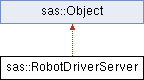
Inheritance diagram for sas::RobotDriverServer:
Public Member Functions | |
| RobotDriverServer (const RobotDriverServer &)=delete | |
| RobotDriverServer (const std::shared_ptr< rclcpp::Node > &node, const std::string &node_prefix="GET_FROM_NODE") | |
| Construct a new RobotDriverServer. | |
| Eigen::VectorXd | get_target_joint_positions () const |
| Get the most recent target joint positions received from clients. | |
| Eigen::VectorXd | get_target_joint_velocities () const |
| Get the most recent target joint velocities received from clients. | |
| Eigen::VectorXd | get_target_joint_forces () const |
| Get the most recent target joint forces received from clients. | |
| Eigen::VectorXi | get_homing_signal () const |
| Get the last received homing signal vector. | |
| Eigen::VectorXi | get_clear_positions_signal () |
| Get the last received clear positions signal vector. | |
| RobotDriver::Functionality | get_currently_active_functionality () const |
| Get the currently active functionality of the robot driver. | |
| bool | is_enabled (const RobotDriver::Functionality &supported_functionality=RobotDriver::Functionality::PositionControl) const |
| Check whether the server supports and is enabled for a functionality. | |
| void | send_joint_states (const Eigen::VectorXd &joint_positions, const Eigen::VectorXd &joint_velocities, const Eigen::VectorXd &joint_forces) |
| Publish joint states (positions, velocities and forces) to clients. | |
| void | send_joint_limits (const std::tuple< Eigen::VectorXd, Eigen::VectorXd > &joint_limits) |
| Publish joint limits (min and max) to clients. | |
| void | send_home_state (const Eigen::VectorXi &home_state) |
| Publish the home state vector to clients. | |
| std::chrono::time_point< std::chrono::system_clock, std::chrono::nanoseconds > | get_watchdog_time_point_from_the_client () const |
| Get the time point received from the client for watchdog synchronization. | |
| std::chrono::time_point< std::chrono::system_clock, std::chrono::nanoseconds > | get_watchdog_time_point_from_the_server () const |
| Get the time point captured on the server for watchdog synchronization. | |
| bool | get_watchdog_trigger_status () const |
| Get the current watchdog trigger status as last received from the client. | |
| bool | is_watchdog_enabled () const |
| Query whether the watchdog is enabled on the server. | |
| double | get_watchdog_period () const |
| Get the configured watchdog period in seconds. | |
| double | get_watchdog_maximum_acceptable_delay () const |
| Get the configured maximum acceptable delay for the watchdog in seconds. | |
| bool | get_shutdown_signal () const |
| Get the current shutdown signal state as last received from clients. | |
Detailed Description
Server interface for robot driver ROS topics.
RobotDriverServer exposes publishers for joint states, joint limits and home state, and subscribes to control-related topics (target joint commands, homing/clear signals and watchdog triggers). It provides getters for the latest received commands, watchdog information and shutdown signal.
Constructor & Destructor Documentation
◆ RobotDriverServer()
| sas::RobotDriverServer::RobotDriverServer | ( | const std::shared_ptr< rclcpp::Node > & | node, |
| const std::string & | node_prefix = "GET_FROM_NODE" ) |
Construct a new RobotDriverServer.
- Parameters
-
node Shared pointer to the rclcpp::Node used for communication. node_prefix Prefix used to compose ROS topic names (defaults to "GET_FROM_NODE").
Member Function Documentation
◆ get_clear_positions_signal()
| Eigen::VectorXi sas::RobotDriverServer::get_clear_positions_signal | ( | ) |
Get the last received clear positions signal vector.
RobotDriverProvider::get_clear_positions_signal. Getting the clear positions signal also clears it.
- Returns
- Eigen::VectorXi Clear positions signal per joint.
- Exceptions
-
std::runtime_error if the server is not enabled for ClearPositions or the clear positions vector is uninitialized.
- Returns
- a Eigen::VectorXi with 0s for configurations that should not be cleared and 1 for positions that should be cleared.
◆ get_currently_active_functionality()
| RobotDriver::Functionality sas::RobotDriverServer::get_currently_active_functionality | ( | ) | const |
Get the currently active functionality of the robot driver.
- Returns
- RobotDriver::Functionality Currently active functionality.
◆ get_homing_signal()
| Eigen::VectorXi sas::RobotDriverServer::get_homing_signal | ( | ) | const |
Get the last received homing signal vector.
get_homing_signal
- Returns
- Eigen::VectorXi Homing signal per joint.
- Exceptions
-
std::runtime_error if the server is not enabled for Homing or the homing vector is uninitialized.
- Returns
- a Eigen::VectorXi with 1s for the joints that should be homed and 0s for the joints that should not be homed.
◆ get_shutdown_signal()
| bool sas::RobotDriverServer::get_shutdown_signal | ( | ) | const |
Get the current shutdown signal state as last received from clients.
RobotDriverServer::get_shutdown_signal returns the shutdown signal sent by the client. If no client sent any signal, this method returns false.
- Returns
- true if a shutdown signal was received, false otherwise.
- The desired signal.
◆ get_target_joint_forces()
| Eigen::VectorXd sas::RobotDriverServer::get_target_joint_forces | ( | ) | const |
Get the most recent target joint forces received from clients.
- Returns
- Eigen::VectorXd Target joint forces vector.
- Exceptions
-
std::runtime_error if the server is not enabled for ForceControl or the requested vector is uninitialized.
◆ get_target_joint_positions()
| Eigen::VectorXd sas::RobotDriverServer::get_target_joint_positions | ( | ) | const |
Get the most recent target joint positions received from clients.
- Returns
- Eigen::VectorXd Target joint positions vector.
- Exceptions
-
std::runtime_error if the server is not enabled for PositionControl or the requested vector is uninitialized.
◆ get_target_joint_velocities()
| Eigen::VectorXd sas::RobotDriverServer::get_target_joint_velocities | ( | ) | const |
Get the most recent target joint velocities received from clients.
- Returns
- Eigen::VectorXd Target joint velocities vector.
- Exceptions
-
std::runtime_error if the server is not enabled for VelocityControl or the requested vector is uninitialized.
◆ get_watchdog_maximum_acceptable_delay()
| double sas::RobotDriverServer::get_watchdog_maximum_acceptable_delay | ( | ) | const |
Get the configured maximum acceptable delay for the watchdog in seconds.
RobotDriverServer::get_watchdog_maximum_acceptable_delay returns the maximum acceptable delay in seconds. This delay could be related to unsynchronised clocks between different computers or network delays.
- Returns
- double Maximum acceptable delay in seconds.
- returns the maximum acceptable delay in seconds.
◆ get_watchdog_period()
| double sas::RobotDriverServer::get_watchdog_period | ( | ) | const |
Get the configured watchdog period in seconds.
RobotDriverServer::get_watchdog_period returns the watchdog period.
- Returns
- double Watchdog period in seconds.
- The watchdog period in seconds.
◆ get_watchdog_time_point_from_the_client()
| std::chrono::time_point< std::chrono::system_clock, std::chrono::nanoseconds > sas::RobotDriverServer::get_watchdog_time_point_from_the_client | ( | ) | const |
Get the time point received from the client for watchdog synchronization.
RobotDriverServer::get_watchdog_trigger_time_point returns the time point received by the Watchdog functionality. This time point corresponds to the moment the signal was sent, as recorded by the client computer's clock.
- Returns
- std::chrono::time_point Time point from the client.
- Exceptions
-
std::runtime_error if the watchdog functionality is not enabled or data is uninitialized.
- Returns
- The desired time point
◆ get_watchdog_time_point_from_the_server()
| std::chrono::time_point< std::chrono::system_clock, std::chrono::nanoseconds > sas::RobotDriverServer::get_watchdog_time_point_from_the_server | ( | ) | const |
Get the time point captured on the server for watchdog synchronization.
RobotDriverServer::get_watchdog_trigger_time_point_when_received returns the time point when the watchdog signal is received. This time point uses the computer's clock on which the server (robot) is running.
- Returns
- std::chrono::time_point Time point from the server.
- Exceptions
-
std::runtime_error if the watchdog functionality is not enabled or data is uninitialized.
- Returns
- The time point when the watchdog signal is received.
◆ get_watchdog_trigger_status()
| bool sas::RobotDriverServer::get_watchdog_trigger_status | ( | ) | const |
Get the current watchdog trigger status as last received from the client.
RobotDriverServer::get_watchdog_trigger_status returns the status received by the Watchdog functionality.
- Returns
- true if watchdog trigger is active, false otherwise.
- Exceptions
-
std::runtime_error if the watchdog functionality is not enabled or data is uninitialized.
- Returns
- The Watchdog status
◆ is_enabled()
| bool sas::RobotDriverServer::is_enabled | ( | const RobotDriver::Functionality & | supported_functionality = RobotDriver::Functionality::PositionControl | ) | const |
Check whether the server supports and is enabled for a functionality.
- Parameters
-
supported_functionality The functionality to check (default: PositionControl).
- Returns
- true if supported and enabled, false otherwise.
- Exceptions
-
std::runtime_error if an unknown or unsupported functionality value is provided.
◆ is_watchdog_enabled()
| bool sas::RobotDriverServer::is_watchdog_enabled | ( | ) | const |
Query whether the watchdog is enabled on the server.
RobotDriverServer::is_watchdog_enabled returns true if the Watchdog functionality is enabled.
- Returns
- true if enabled, false otherwise.
- A flag denoting if the Watchdog functionality is enabled.
◆ send_home_state()
| void sas::RobotDriverServer::send_home_state | ( | const Eigen::VectorXi & | home_state | ) |
Publish the home state vector to clients.
- Parameters
-
home_state Vector representing home states per joint.
◆ send_joint_limits()
| void sas::RobotDriverServer::send_joint_limits | ( | const std::tuple< Eigen::VectorXd, Eigen::VectorXd > & | joint_limits | ) |
Publish joint limits (min and max) to clients.
- Parameters
-
joint_limits Tuple containing (min_limits, max_limits).
◆ send_joint_states()
| void sas::RobotDriverServer::send_joint_states | ( | const Eigen::VectorXd & | joint_positions, |
| const Eigen::VectorXd & | joint_velocities, | ||
| const Eigen::VectorXd & | joint_forces ) |
Publish joint states (positions, velocities and forces) to clients.
Sends the current joint states through ROS.
- Parameters
-
joint_positions Vector of joint positions. joint_velocities Vector of joint velocities. joint_forces Vector of joint forces. joint_positions vector of . If not needed, use joint_positions=Eigen::VectorXd(). joint_velocities. If not needed, use joint_velocities=Eigen::VectorXd(). joint_forces. If not needed, use joint_forces=Eigen::VectorXd().
The documentation for this class was generated from the following files:
- src/sas_robot_driver/include/sas_robot_driver/sas_robot_driver_server.hpp
- src/sas_robot_driver/src/sas_robot_driver_server.cpp